Public bodies, local authorities and companies work with changing external partners every day: tradespeople for maintenance, seasonal staff at council events, service providers for building cleaning or IT support. To keep locking systems and equipment secure, access and contacts have to be managed flexibly, without time-consuming set-up.
Log+Key makes onboarding and permissions for external people simple: contacts become users in one click, you add new contacts right while assigning, and dedicated roles decide what external people see. This article shows how the three features work together.
Contact or user: which fits which external person?
That depends on whether the person should take out and return objects themselves. Contacts are people outside your organisation who are assigned objects but never sign in. Users have their own access in the browser, at the terminal or both.
| Contact | User | |
|---|---|---|
| Signs in | never | in the browser and/or at the terminal |
| Gets objects | assigned by your team, receipt by email | takes out and returns them themselves |
| Sees | nothing in the system | what their role and location access allow |
| Typical for | a tradesperson on a one-off job, surveyors, tenants | a cleaning firm with a fixed team, a security service, long-term seasonal staff |
Because Log+Key does not charge per user, an extra login costs nothing: every plan includes unlimited users.
How does a contact become a user with their own access?
With one click on Convert to user on the contact. If a service provider works with you long term and should take out their objects themselves from now on, you don't have to create the person again.
- Seamless conversion: Log+Key takes the name, email, phone number, job title and company from the contact.
- Ready straight away: during the conversion you choose the access (browser, terminal or both), the roles and the location access.
- Nothing gets lost: objects assigned to the contact come along, and the history continues the entries under the same name.
Screencast: opening a contact, Convert to user, choosing the access and confirming the conversion
The individual steps are in the guide Turning a contact into a user.
How do you add a new contact right while assigning?
With the entry Add new contact in the person list. Spontaneous key handovers at reception leave no time for switching menus.
- Create it from the list: when you choose the person while assigning an object, the new contact is one entry away in the same list.
- No interruption: the handover carries on. New tradespeople, service providers or temporary staff are recorded in seconds, and the receipt goes to them by email.
Screencast: adding a contact, assigning an object to the contact and sending them a receipt by email
More in the guide Handing objects to external people.
How do you limit what external people see in the system?
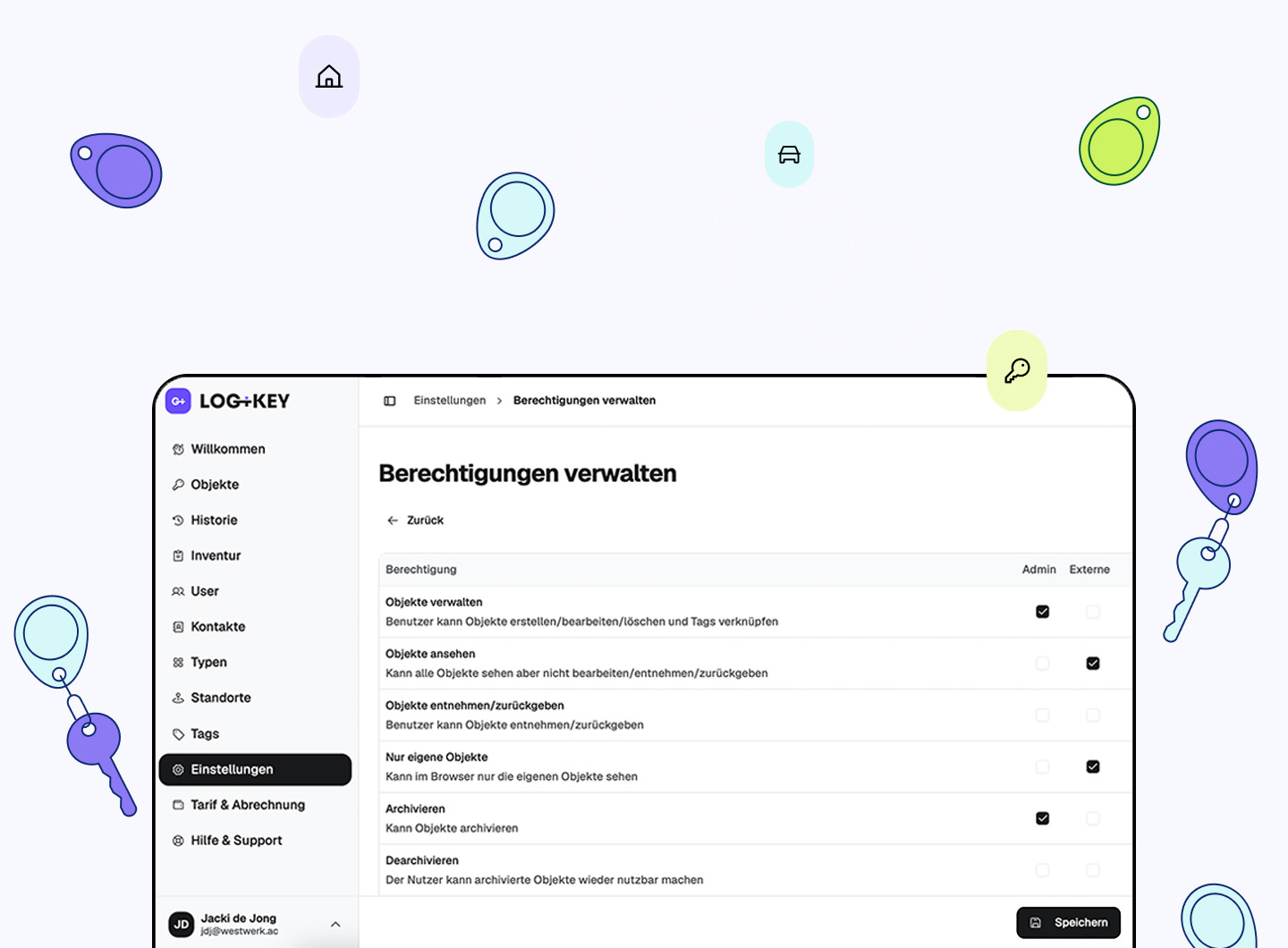
With a dedicated role with few permissions, plus location access. External staff should get exactly the access they need for their work.
- Only Own Objects: with this permission a role sees only its own take-outs in the browser, not the whole inventory.
- Location access: the person only sees the objects of the locations you allow, for example a single building.
- Confidential stays internal: areas such as billing and subscription or the settings stay reserved for roles with the matching permissions.
How to create such a role is described in Managing roles and permissions.
The key benefits at a glance
- Less admin: no entering data twice when a contact becomes a user.
- Fast onboarding: service providers, tradespeople and seasonal staff are recorded in seconds.
- Complete records: every handover to an external person is in the history with a receipt, easy to trace.
- Clear permissions: external people only see the locations you allow and, if you like, only their own objects.
How Log+Key is used in companies and public bodies is shown on the pages Key management for companies and organisations and Key management for public institutions. The features came with Log+Key 2.5; for all features at a glance see key management system.
Would you like to see how Log+Key can support your organisation? Book a free demo: we'll show you in 15 minutes how easy it is to get started. Or create your own test instance and see for yourself.